60 questions · 100 total marks · 90-minute exam window. Practise putting events in order, matching items and using code, logs or diagrams to answer a question. The practice demo is unscored. All required parts must be complete before an answer can be saved.
What you can practise
Single answerChoose one option.
Multiple selectionChoose the options the prompt asks for.
Exclusive matchingUse each matching option at most once.
OrderingPut the steps or events in sequence.
Multipart caseUse code, logs or diagrams to complete every required part.
The examination has 60 questions, 100 total marks, 90 minutes and 12 subjects. You move forward only: Q1–59 use Save & Next, and Q60 uses Save & Submit Test.
Only answers the server has saved are scored. An unsaved draft earns nothing. During the examination you do not see marks for any question or part, earned marks, correctness or answer keys.
The practice below is for learning the controls. It is unscored, uses synthetic questions and never counts as registration or attendance.
How answers are saved
Complete every required part of the current answer.
Select Save & Next. The next question opens only after the server saves the answer. You cannot return to an earlier question.
For question 60, select Save & Submit Test. An unsaved draft does not count.
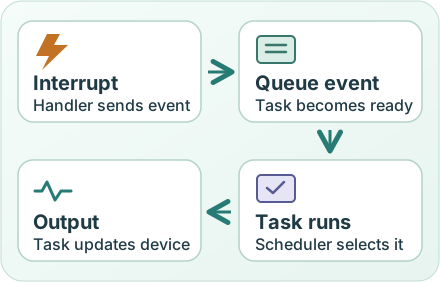
The handler uses an interrupt-safe queue operation to send the event. The waiting task becomes ready. After the scheduler selects it, the task updates the output.
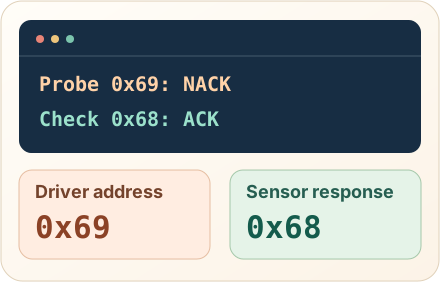
Compare the address evidence
Swipe sideways to see the whole diagram.
The trace shows the 7-bit probe address and response. Compare the driver configuration with the responding address, then verify the intended address against the device configuration.